
OpenClaw (Clawdbot\Moltbot)
Yes OpenClaw (formerly ClawdBot\Moltbot) is supported with the MiniMax-M2 model. We have a quick start script to get you going. However please exercise caution and follow best practices. VPS, Sandbox, VM and only grant required permissions.
Due to the potentially high API costs, this service is ideal giving you cost certainty. We do ask that at this time, Moltbot is used with the MiniMax-M2.5 model due to the advanced agent and tool usage requirements.
The install script has an option to preserve existing config and update models only.
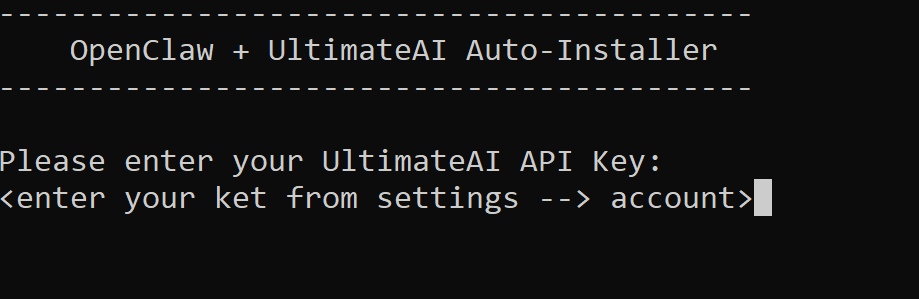
This script is intended to run BEFORE the installation of ClawdBot\MoltBot, it will download config files and ask for your API Key from UltimateAI then trigger the install.

The install script has an option to preserve existing config and update models only
Single command to get you going;
curl -fsSL https://ultimateai.org/openclaw/setup.sh | tr -d '\r' | bash
TIPS:
* OpenClaw can be extremely dangerous, only for advanced users and do not expose to the inbound internet.
* Feel free to review the setup.sh
* Currently Telegram works a lot better than WhatsApp
* Recommend connecting Integrations via Zapier. This can be done of the Free Plan.
* Extreme caution processing internal emails (numerous exploits attackers sending malicious emails to OpenClaw)
* Go SLOW, each integration is a RISK
Linux\WSL Walkthrough$ curl -fsSL https://ultimateai.org/openclaw/setup.sh | tr -d '\r' | bash
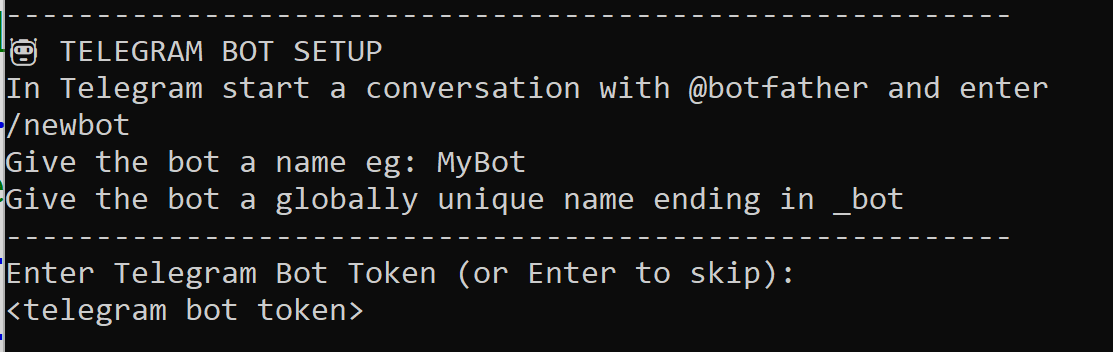
Message your bot via Telegram and follow the instructions to Pair.